


Rank One
4.0132.00 Reviews
App Specs
- Version
- 3.10.58
- Updated On
- License
- Free
- Downloads
- 100,000+
- Developer
- AllPlayers Network
- Categories
- Sports
- Platform
- Android
Screenshots
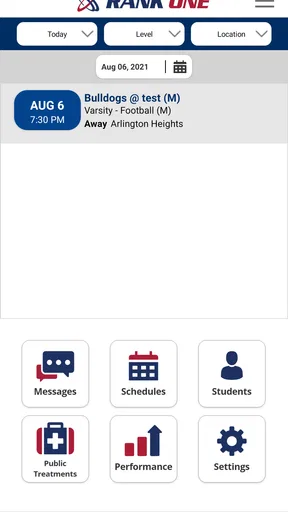
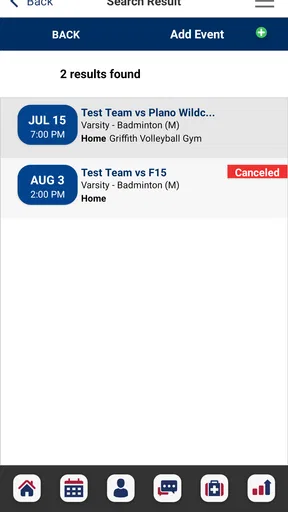
 Analysis by AppCompare
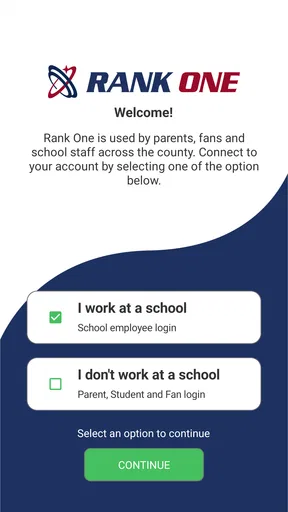
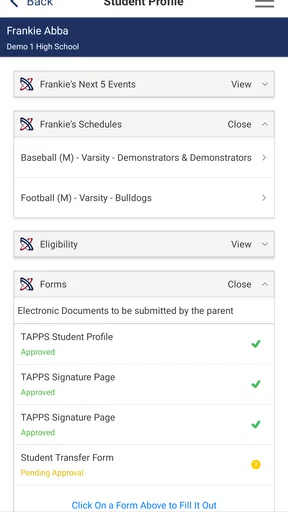
I’d treat Rank One as a school-centered sports companion rather than a general-purpose event planner. Its purpose is to help school users, parents, students, and fans keep up with sports and fine arts, so its value depends on whether your school or activity uses it. If it does, it can offer a shared place to check what is happening; if it does not, there is little reason to expect it to replace your usual calendar or team chat.
A school-focused tool, not a universal league manager
That distinction matters before you install it. I would not choose Rank One to organize a neighborhood tournament from scratch or to run a family game night: the app is aimed at following school activities, not serving as an open event platform for any group. For a parent trying to keep tabs on a student’s team, or a student checking an activity schedule, that narrower focus may be exactly what makes it useful.
In the sports-app category, the common alternatives tend to fall into two camps: a school’s own website or messages for official updates, and general calendars or group chats for reminders and coordination. Rank One sits closer to the first camp, with a mobile view of school sports and fine arts information. Its practical advantage is having relevant information in an app rather than having to search through old messages. The trade-off is that it is only as useful as the school information available through it.
Where it fits into a school day
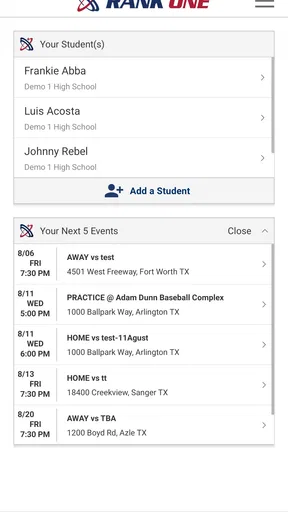
Picture a parent leaving work and trying to work out whether to head to a game, pick up a student after practice, or plan around a school performance. The sensible workflow is to check the app before making the trip, then use the school’s established communication channel if a detail needs clarification. That small habit can reduce last-minute searching, but it is not a substitute for confirming an unusual change directly with the school.
Students and fans have a different reason to open it: they may simply want a quick view of school activity information without asking someone else to forward it. Fine arts coverage also gives it a wider role than a sports-only score tracker. I would still think of it as a companion to the school’s own notices, not as a guarantee that every detail a family needs will be in one place.
What to check before relying on it
Before building a routine around Rank One, I’d first confirm that the relevant school or activity is represented and that the information you need is easy to find. Then I’d check how the app handles the particular details your household cares about, such as dates, locations, or changes. That is a more useful test than judging it from a quick browse, because an app can feel simple yet still be a poor fit if the school’s information is incomplete for your needs.
A second practical point is to decide which updates deserve attention. If you already receive school announcements elsewhere, keeping every channel equally prominent can create noise rather than clarity. I would use Rank One as the place to look for activity information, while leaving urgent or exceptional arrangements to the communication method the school tells families to use.
Worth Reading Before You Choose

EA SPORTS FC Mobile 26 Is a Bigger Football Game, but It Takes Time

Flipboard Shows What News Apps Must Do Beyond the Feed

Switching to Android Auto Means Rethinking Your Driving Routine

Google Calendar Makes a Crowded Week Easier to Manage

Ludo King Makes the Most of the Minutes Between Plans

Baby Panda World Brings Quick Play to Modern Phones, but Its Game Library Feels Busy
It is also worth remembering that the app serves several audiences at once. A student checking an activity and a parent coordinating transport may be looking for different things. One person’s quick glance is not necessarily enough for the whole household, so agreeing on who checks the information—and when—can prevent duplicated messages or assumptions.
Getting Started
Jumping into Rank One is like diving into a sea of possibilities, but without any of the drowning. Setting up is a breeze. You download the app, sign up, and voilà, you’re in. The interface is intuitive, and even if you’re not the most tech-savvy person, you’ll find your way around without breaking a sweat.
Features Galore
Now, let’s talk about the features because this app is packed with them. You can create, manage, and organize events with just a few taps. The scheduling tool is incredibly handy; it automatically updates participants about their upcoming matches or events. No more confusing text threads or missed emails—everything is centralized in the app.
One of the standout features is the live score updates. It’s like having your own personal sports commentator in your pocket. Friends and family can follow along in real-time, which adds a whole new level of excitement to any event. And if you’re the competitive type, the ranking system will definitely tickle your fancy. It keeps track of wins, losses, and points, giving you a clear view of who’s leading the pack.
User Experience
Using Rank One feels like having a personal assistant who’s not only efficient but also understands exactly what you need. The app’s design is sleek and modern, with a clear focus on usability. You won’t find any unnecessary bells and whistles here, just straightforward functionality that gets the job done.
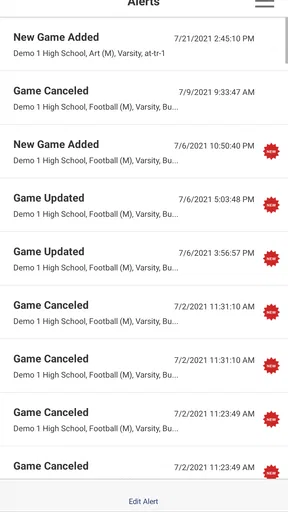
Notifications are another strong suit. They’re timely and not overly intrusive. You get reminders about upcoming events, score updates, and any changes in schedules. It’s like having a little nudge to keep you on top of things, which is super helpful if you’re juggling multiple events or teams.
Community and Support
One thing that sets Rank One apart is its community feel. You’re not just using an app; you’re joining a network of like-minded individuals. There’s a built-in chat feature that lets you communicate with other users, share tips, or just celebrate victories together. Plus, the support team is responsive and genuinely helpful. Any issues or questions, and they’ve got your back.
Final Thoughts
All in all, Rank One is a solid choice for anyone looking to streamline event management and enhance the competitive experience. It’s user-friendly, feature-rich, and backed by a supportive community. Whether you’re a seasoned event organizer or just starting out, this app is worth checking out.
If you’re curious to see how Rank One can fit into your event management toolbox, I’d say give it a try. It might just be the missing piece you’ve been searching for.
Current standing and product history
Rank One is a free sports app developed by AllPlayers Network. It is rated for Everyone, has passed 100K installs, and holds an average rating of 4.1 from 379 ratings, with 124 written reviews. Those figures suggest a real user base, though they cannot tell me whether a particular school’s information is current or complete; that is something to judge against the activities you actually follow.
The app was released on August 6, 2021, and its current version is 3.10.38. Those facts show that it has continued to receive versioned development since its initial release, but they do not establish which functions changed along the way. I would avoid assuming a particular improvement or redesign from a version number alone. On iOS, the listed minimum OS is 9, so compatibility is worth checking against the device you plan to use.
For an existing user, an update is most valuable when it makes everyday information easier to locate or keeps school activity details dependable. I would check the release notes when updating and then verify the next event I care about in the app, rather than assuming that a new version necessarily changes how schedules or alerts work. That is especially sensible if other family members rely on the same routine.
Limits and sensible expectations
The main limitation is also the product’s defining boundary: Rank One is useful within the school activity context, not as a universal answer for every team, league, or arts group. A family whose school does not use it, or whose most important team communicates elsewhere, may get more dependable results from the school website, its official messages, or the team’s established channel. I would not move every reminder into this app until I knew it covered the right activities.
There is another distinction between being able to see activity information and being able to manage all the logistics around it. Families may still need a shared calendar for transport, a group message for arranging rides, or direct school communication for a last-minute exception. Trying to make one app do all those jobs can create confusion. Rank One makes most sense as a focused information source alongside those tools, not necessarily as their replacement.
If you are deciding whether it belongs on your phone, I’d ask two practical questions: does it include the school activities you follow, and does its information save you a real step compared with your current routine? If both answers are yes, it is an easy app to justify trying at no charge. If not, installing it simply because it covers school sports is unlikely to change how you manage your day.
Who should keep an eye on future changes
Parents, students, and fans who already use Rank One should watch for changes that affect the reliability and clarity of activity information, rather than expecting a version update to turn it into a general organizer. For new users, the first useful test is still whether the school’s activities appear in a way that answers their everyday questions. The app’s established focus is clear; whether it fits your routine comes down to that local usefulness.
Pros
- Intuitive user interface for easy navigation.
- Comprehensive tracking of daily activities.
- Seamless integration with wearable devices.
- Customizable notifications and alerts.
- Offers a variety of fitness challenges.
Cons
- Limited free features without subscription.
- Occasional sync issues with older devices.
- Requires constant internet connection.
- Some features locked behind paywall.
- User data privacy options could be improved.
FAQs for Rank One
What is Rank One, and how does it work?
Rank One is a competitive strategy game that challenges players to climb leaderboards by completing tasks and winning battles. The game combines elements of resource management and tactical combat, requiring players to plan their moves carefully. It offers both single-player and multiplayer modes, allowing users to engage with friends or players worldwide.
Is Rank One available for both Android and iOS devices?
Yes, Rank One is available for download on both Android and iOS platforms. You can find it on the Google Play Store and the Apple App Store. The game is optimized for a wide range of devices, ensuring smooth gameplay on both operating systems.
Are there any in-app purchases or ads in Rank One?
Rank One offers in-app purchases that allow players to buy game currency, special items, and premium features. While the game can be enjoyed for free, these purchases enhance the experience. Additionally, there are ads, but they are minimal and do not disrupt gameplay significantly.
What are the system requirements to run Rank One smoothly?
To enjoy Rank One without issues, Android users should have a device running Android 8.0 or higher, while iOS users should have iOS 11 or later. Adequate RAM and a stable internet connection are recommended for the best experience, especially during multiplayer matches.
How does Rank One ensure player safety and privacy?
Rank One takes player safety and privacy seriously, employing robust encryption and data protection measures. User data is stored securely, and the game complies with international privacy regulations. Parents can also enable parental controls to limit in-app purchases and monitor gameplay.


